WooCommerce Price Based on Country: Geo IP Rules and Fixed Prices
WooCommerce prices based on country means one thing in practice: a visitor from Germany and a visitor from India open the same product page and see two different numbers — each in their own currency, and each an amount you decided on, not one the exchange rate happened to produce that morning.
FOX does this with Geo IP rules. There is no separate add-on and no second plugin: the country is detected on the first request, the matching currency is applied, and the price is taken from the rule you set.
Converted price or your own price
Two ways to price a market, and the difference matters more than it looks.
Converted. You keep one base price and the rate does the work. Simple, always current, and the customer sees 45.37 instead of 45. Fine for markets you treat the same way.
Fixed per currency. You store the exact amount to charge in each currency. A product at 49 in the base currency sells at 45 in euro and 3,900 in rupees because those are the numbers that work in those markets — round, familiar, and stable whatever the rate does this week.
Country-based pricing is usually the second kind. Purchasing power, local competition and what a price "looks like" in a market are not exchange-rate problems.
Setting up WooCommerce price based on country
- In the Advanced tab set Is multiple allowed to Yes and press Save.
- Enable Checkout by GeoIP rules.
- Enable Individual GeoIP rules for each product if you want per-product control as well as shop-wide rules.
- Set your GeoIP rules in their own tab — which country gets which currency.
- On a product, press The product custom GeoIP rules and set the price this product should have in that market.
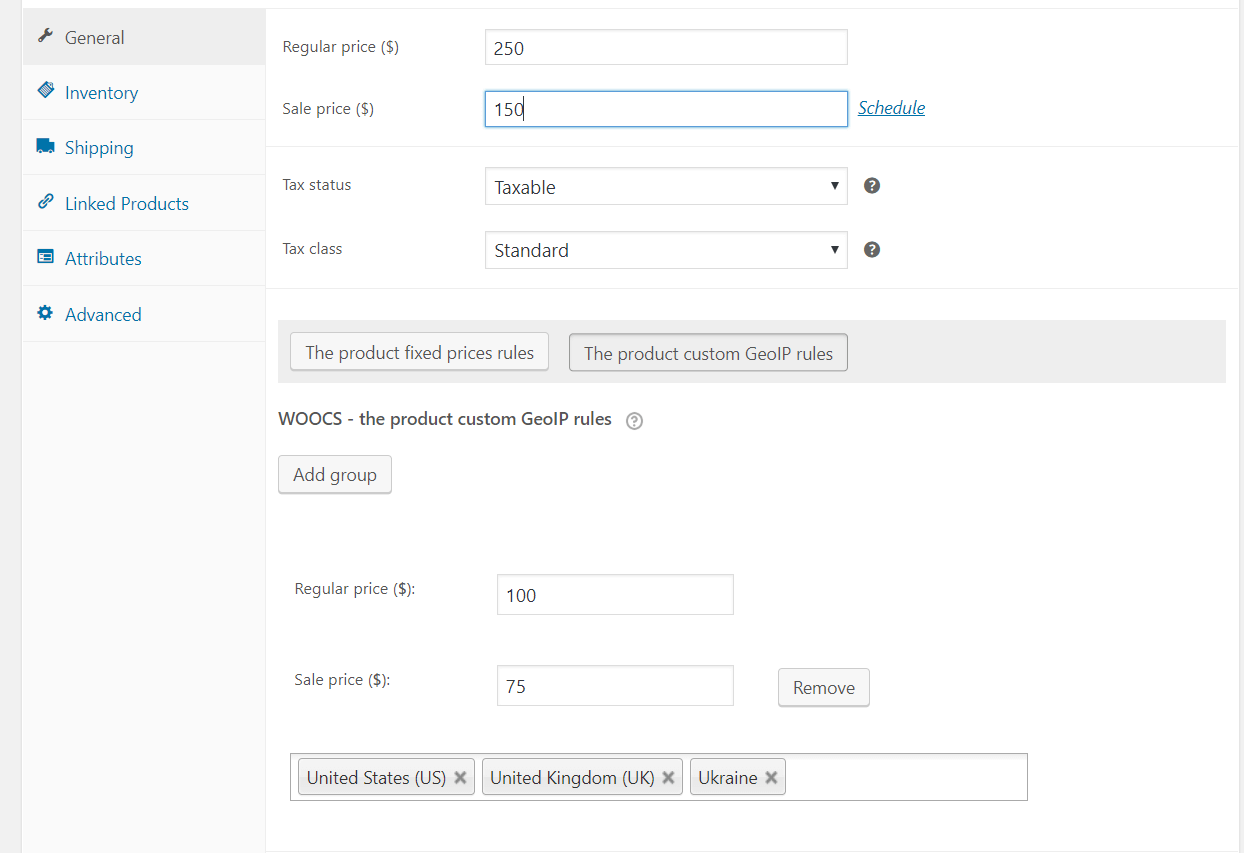
Country based pricing: shop-wide or per product
Shop-wide rules cover the normal case: this country, this currency, prices converted at the current rate. Per-product rules exist for the exceptions — a product that is cheap to ship in one region and expensive in another, or a line where a competitor forces your hand in one market only.
You do not have to choose. Set the shop-wide rule once, then override the handful of products that need it.
What follows the country besides the price
Country-based pricing that stops at the number is only half done. With FOX the rest follows too:
- Payment gateways — each currency only offers the gateways that can settle in it, so a customer never reaches a failed payment.
- Free shipping thresholds — stored per currency, so a 100 threshold does not turn into 92.40 abroad.
- Fixed-amount coupons — the discount keeps the value you intended in every market.
Before you rely on it
Geo IP needs WooCommerce geolocation to be working, and geolocation and page caching argue with each other: a cached page was built for whoever loaded it first. If your shop is cached, read how a currency switcher and a page cache fight each other before you go live — the setting that fixes it takes a minute, and finding out later takes a week.
A visitor's own choice also outranks the rule: once someone switches currency by hand, that choice sticks for the session. Geo IP decides what they see first, not what they are stuck with.