[woocs]
Attributes:
- txt_type - 2 possible values: desc and code.
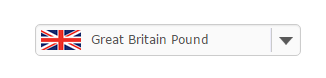
- desc - on the front end will be shown currency description in the drop-down options
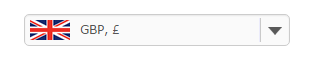
- code - will be shown currency code and its sign in the drop-down options
![[woocs]](/uploads/media/2016/07/shortcode-466-1-300x60.png)
![[woocs]](/uploads/media/2016/07/img-466-2-200x200.png)
![[woocs]](/uploads/media/2016/07/img-466-3-200x200.png)
![[woocs]](/uploads/media/2016/07/img-466-4-200x200.png)
![[woocs]](/uploads/media/2016/07/img-466-5-200x200.png)

- desc - on the front end will be shown currency description in the drop-down options
- flag_position - (ddslick only) flag position. You can set side: left or right.
- width - width in px or %. Set its value like '300px' or '75%'
- show_flags - show or hide flags. Possible values: 1 or 0
- style - added in version 2.2.9/1.1.9 for new styles system. Set there value from 1 to 3 (depends of in-built count of styles)

- sd - special attribute for "Smart Designer", example: [woocs sd=7] where '7' is number of created design.
- css_class - (from v.2.3.9/1.3.9) allows you to add to tag <select> custom css classes + special value there ‘woocs_clean_select‘ which allows you to avoid applying of selected skins and always show pure drop-down
![[woocs]](/uploads/media/2016/07/shortcode-466-3.png)
![[woocs]](/uploads/media/2016/07/img-466-4.png)
Skins with names like 'Style' has their own targeted attributes:
- Style #2: head_bg - color of head background, head_txt_color - head text, head_close_bg - bg color of cross button, head_close_color - color of cross in close button. Example: [woocs style="2" head_bg="#ff0000" head_txt_color="#000" head_close_bg="green" head_close_color="yellow"]
- Style #3: head_title - Text of head title, leave it empty to hide. Example: [woocs style="3" head_title="Select Currency"]
ATTENTION: all attributes above doesn't work for drop-down created by Smart Designer
If you want to set the switcher somewhere in the site code, for example in your wp theme header.php or footer.php use next code please:
<?php echo do_shortcode('[woocs show_flags=1 txt_type="desc" style=3]'); ?>